SpiritVNC is on GitHub. Please see the
FLTK version
repo as well as the GTK
version repo for the latest code, to file a bug report or other fun stuff. 
What is this?
SpiritVNC is a VNC viewer that allows you to have many simultaneous
connections open and allows you to switch between them quickly. Besides
 regular VNC connections, SpiritVNC also supports VNC-through-SSH for
encryption and more secure connections. Also supported are reverse or
'listening' VNC connections as well as an auto-scan function that displays
one VNC viewer for a user-defined time, then automatically displays the
next connected viewer and so-on. SpiritVNC-FLTK is based on the FLTK toolkit,
which is lightweight, easy on resources and is available on many platforms while
SpiritVNC-GTK is based on GTK3.
regular VNC connections, SpiritVNC also supports VNC-through-SSH for
encryption and more secure connections. Also supported are reverse or
'listening' VNC connections as well as an auto-scan function that displays
one VNC viewer for a user-defined time, then automatically displays the
next connected viewer and so-on. SpiritVNC-FLTK is based on the FLTK toolkit,
which is lightweight, easy on resources and is available on many platforms while
SpiritVNC-GTK is based on GTK3.
SpiritVNC currently compiles and runs on macOS, Linux, FreeBSD, OpenIndiana and experimentally on Windows 10 and 11. The program requires the following properly installed libraries and development packages:
FLTK version requirements
• FLTK 1.4.x or newer
• libvncserver
(or just libvncclient)
GTK version requirements
• GTK 3 development and library packages
• gtk-vnc development and library packages
Both versions
• macOS users should use Homebrew to install the necessary dependencies
• Windows 10 and 11 users should install MSYS2 and build / run in that environment
• An openssh-compliant SSH client installed on your system
• The pkg-config program is also required for building
I am not currently offering pre-compiled binaries although this may change later.
Background
Many years ago I was happily using Remmina, but after it hit version 1.0.0,
it was buggy and wasn't as reliable as the 0.9.x version. So I created a
Python-GObject VNC multi-viewer called UnRemmina that helped me leave
behind the frustration with Remmina 1.0.0. The problem with UnRemmina
(besides the less-than-complimentary name) was that it relied on many
different GTK components that aren't always shipped with certain Linux or
BSD distros, so it wasn't very portable. What to do? Make my own!
SpiritVNC was born.

The SpiritVNC - FLTK VNC viewer

The SpiritVNC - GTK VNC viewer
I know there are a lot of other VNC viewers out there, but everyone has their own favorites, and who knows, maybe SpiritVNC will be yours? Even if no one else uses this, I wanted to at least make it available to others.

A demonstration of how the auto-scan function works
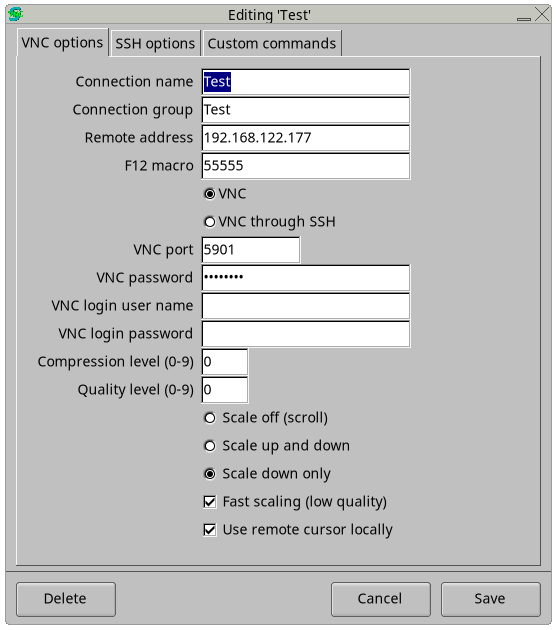
Editing a connection's settings
As shown in the image above, you can set the viewer to scroll the host's screen, scale it both up and down, or just scale down. You can also choose fast scaling and also enable or disable the display of the host's remote cursor.

SpiritVNC is on GitHub. Please see the
FLTK version
repo as well as the GTK
version repo for the latest code, to file a bug report or other fun stuff.
If you have any questions, have suggestions or want to submit a bug report, please visit the GitHub repo or leave a comment below.
Comments